|
Advanced Editors |


|
|
Advanced Editors |
|
Use advanced editors to customize operating system, browser, search engine, status/error descriptions and spider identification lists.
You can also edit these lists manually with any text editor. To find files use Tools | Folders | All User Settings option from the main menu.
Operating Systems, Browsers and Status/Errors
Editors for all three lists are similar.
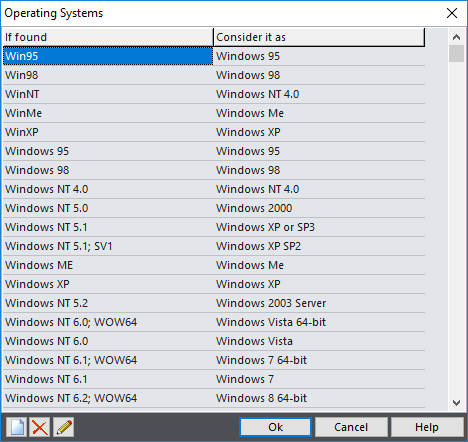
If found |
Part of User Agent text that identifies item |
Consider it as |
Human-readable description |
This editor is used to define how Web Log Storming recognizes search engines and search texts. Compared to the editors previously described, this editor is slightly different - it contains four columns.
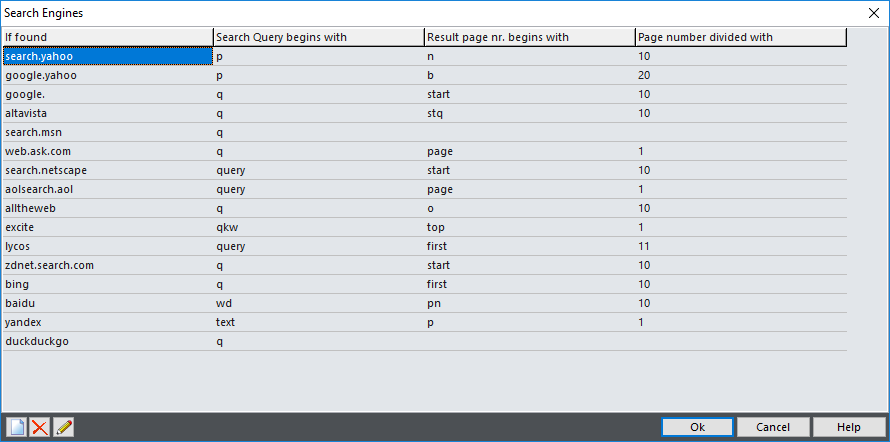
If found |
Part of referrer text that identifies a search engine. It's also used in reports as a human-readable name |
Search Query begins with |
Value name from referrer query that represents search text. For example, Google and MSN use "q" ("...?q=search+text") and Yahoo uses "p" ("...?p=search+text"). |
Result page nr. begins with |
(Optional) Value name from referrer query that represents result page number. For Google it's "start" ("...?...&start=20"). |
Page number divided with |
(Optional) Depending on the search engine, the page number value can represent the index of first visible result instead of the real page number. For example, if Google sends "start=20" in referrer text, it's actually 3rd and not 20th page. To correct this, enter 10 into this column.
In other words, here you should enter default number of results on one page used by the search engine. |
Note that Google decided not to share search keyword information anymore, so there is no way for you to learn which Google search terms visitors use to find your website, by using Web Log Storming or any other web analytics solution. We have hoped that this policy will be changed, but apparently it won't happen. You can still see keywords from Yahoo, Bing and other search engines.
Spider User Agents and Domains
In these windows you can enter parts of User Agents that identify them as a spider (bot, crawler) and their IP addresses or domains. Note that not all spiders "behave" properly and that they sometimes introduce themselves as legitimate web browsers. In that case, you should define IP address wildcards by using Tools | Spider Domains.
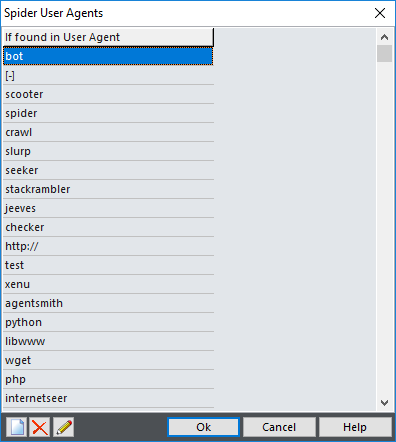
If found |
Part of User Agent text that identifies spiders |
In addition to this method, Web Log Storming also considers all visitors that access the /robots.txt file as a spider.